

Virtual DESTINATION: Canadian Rockies
March 8 - June 20, 2026

Let's Move with Kindness
A Virtual International Journey
Embark on a 15-week, 1,050 km virtual journey with a Kindness Buddy. Walk, roll, run—your way—across the border while logging miles, building community, and supporting Rocky Mountain Adaptive.
March 8 – June 20, 2026
Kindness:
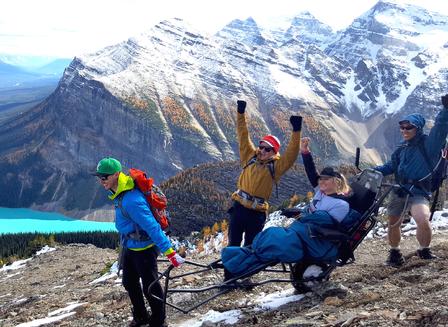
Kindness Adventures partners with Rocky Mountain Adaptive to create accessible and inclusive spaces for individuals living with disability, physical and developmental challenges, and/or neurodiversity to participate, learn, and excel in mountain sports and recreation.
This virtual journey invites our global community to move together — transforming everyday movement into meaningful support for accessible adventure.
Wherever you are, however you move, every mile helps create opportunity, connection, and belonging.
Adventures:
This international virtual expedition travels 1,050 km from the USA to the Canadian Rockies. Over 15 weeks, participants walk, roll, run, or move their bodies in their own way while journeying together toward Canmore, Alberta — home of Rocky Mountain Adaptive.
It’s not a race.
It’s a shared adventure powered by kindness, community, and purpose.
Empowering women to make a difference through kindness and adventure
About This Journey
WHY: To raise funds supporting Rocky Mountain Adaptive’s mission to facilitate accessible and inclusive spaces for individuals living with disability, physical and developmental challenges, and/or neurodiversity to participate, learn, and excel in mountain sports and recreation.
WHERE: From Kindness Adventures’ headquarters in Blaine, Washington, to Rocky Mountain Adaptive’s headquarters in Canmore, Alberta, in the heart of the Canadian Rockies.
WHEN: The journey begins Sunday, March 8 and concludes Sunday, June 20—or whenever you complete your 1,050 km.
HOW: Movement looks different for everyone. Whether you walk, roll, run, use a wheelchair, hand-cycle, or move with adaptive equipment—every mile and every effort counts.
Sync your activities through My Virtual Mission (MVM) using Garmin, Runkeeper, Fitbit, Apple Health, or manual entry.
Show Off Your Kindness
Along the Journey
Track your progress with your Kindness Buddy, share photos, and receive updates through the MVM app and on Instagram. Treasures and surprises await at milestones along the way.
Kindness Buddies
Kindness goes further when we move together.
This is not a race. It’s an inclusive community of all abilities, moving our bodies in whatever ways are possible—bringing more kindness, joy, and support to accessible adventures.
When you register, you may name your Kindness Buddy, or we’ll happily pair you with a virtual buddy so no one journeys alone. (Note: Your Kindness Buddy will need to register as well, so you can track your progress together.)
“Where Will Kindness Take You?”
Every participant receives their choice of Kindness Adventures × Kind Cotton t-shirt.* With every registration, Kind Cotton donates a book to a child.
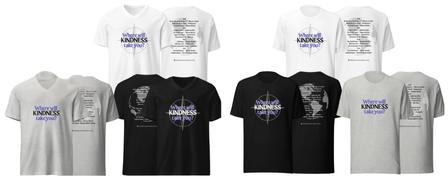
* Shirts shipped to USA and Canada only.

Registration
$75 USD each
This virtual journey includes:
MY VIRTUAL MISSION APP
~ March to June - Collectively Walk, Run, Roll
~ 1050 km Virtual Trail with a Kindness Buddy (or team)
KIND COTTON T-SHIRT
~ Choice of crew or v-neck in 3 colors
List the name of your Kindness Buddy when you register or we can assign one for you!
Your Kindness Buddy will need to register as well, so you can track your progress together.
The mission begins March 8th, but registration will remain open, so sign up and join us!
Where will kindness take you?
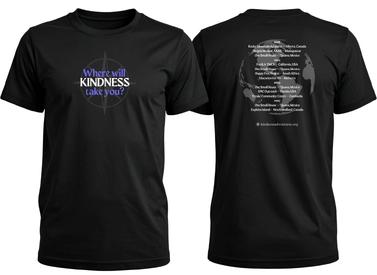
Sample shown is the front and back of our black crew neck t-shirt from Kind Cotton
Available in grey, white & black from XS to 5X.
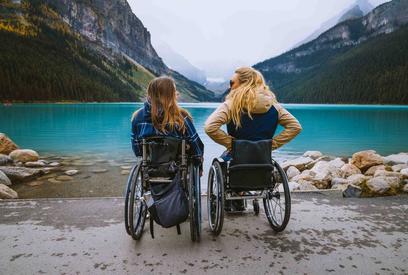
Canmore, Alberta Canada
Rocky Mountain Adaptive
Rocky Mountain Adaptive, a charitable organization that facilitates accessible adventures for individuals living with physical and/or neurodivergent challenges. Learn more.

FAQs
Can I still join after the expedition begins on March 8th?
Yes, you can still register with a buddy or request to be assigned to someone. The more the merrier!
I listed my Kindness Buddy on my registration, do they need to register too?
Yes, your Kindness Buddy will need to register as well so you can track your progress together.
I live outside of the United States and Canada. Can I still get a t-shirt?
We will try and make it work for you! Please email us at info@kindnessadventures.org.
I have more questions about this event, whom can I contact?
Please email info@kindnessadventures.org with any questions.
I received my welcome email from My Virtual Mission (MVM), how do I log in?
Visit the My Virtual Mission login page, and select Forgot Password to create your password and log in. Be sure to use the email you used when you registered for the event.
How do I manually enter miles?
You can manually add miles to your journey if your device doesn't connect to the app.
I'm having issues syncing my miles with Apple Health.
Please refer to this article on how to connect Apple Health to the app.
How can I see whose on my team?
You can see your team members in the "Newsfeed" by filtering by “activity” and “my team."
You can also go to the My Mission page, click the blue icon at the top of the page and click Settings. You'll find your team mates under the My Team tab.
How can I chat with my team mates on the app?
On the App home page, click on the "Newsfeed" tab. Then in the filters section select "My Team" to share news or photos with your team mates only.
My miles aren't showing up on the MVM app using my tracking software.
Be sure to check the settings in your tracking software, it may be set up to post automatically at the end of the day.
My miles are double posting. What can I do?
This appears to be due to Apple Health - Workouts. In this case, we can recommend you disable the Apple Health - Workouts source within your challenges posting preferences.
How do I delete duplicated distances?
If you've noticed that you have duplicated distances, click here to learn how to remove them.
I have more questions about using the app, is there a support page?
You can access support via the MVM App from the Main Menu > Support.
You can email them directly at mvmsupport@myvirtualmission.com.
Click here to view to help articles for My Virtual Mission.
Kindness Adventures is a 501c3 non-profit tax ID#92-2242927 empowering women to make a difference through kindness and adventures. Your donation supports the work of the non-profits we support, helps to provide scholarship funds for women traveling to Kindness Destinations and other operational needs.